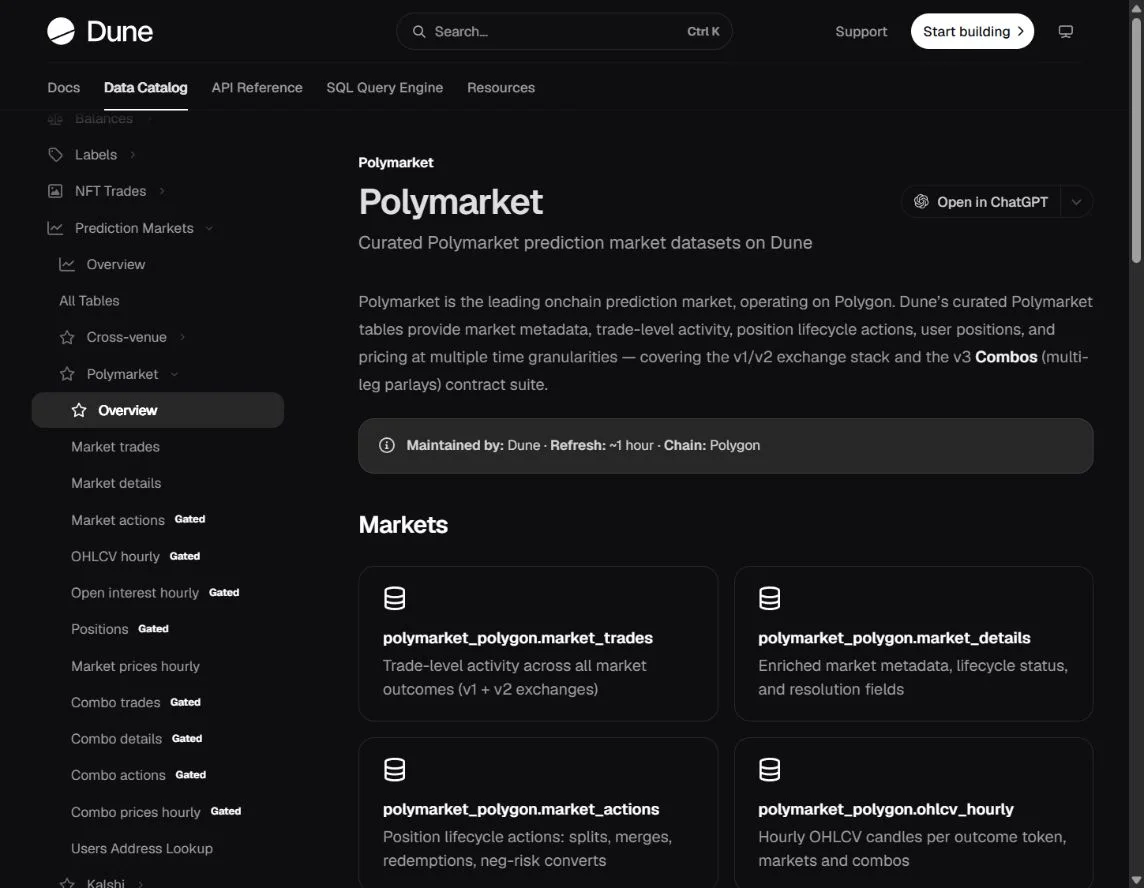
Dune is useful when you want to inspect the query behind a prediction-market chart instead of accepting an unexplained number. You can review public dashboards, inspect SQL and build a repeatable analysis from documented tables. Your account, plan and query limits determine what you can run; some curated datasets are gated.
This guide uses the current Dune catalog checked October 21, 2026. The SQL below is a source-checked starting example, not a query we executed in a paid Dune workspace. It measures market activity, not a strategy's profits.
Choose the dataset that matches the question
For Polymarket fills, Dune documents polymarket_polygon.market_trades. Market descriptions and outcomes live in separate metadata tables. Position lifecycle actions, daily positions and combos have their own tables and access conditions.
That separation matters. A list of fills is not a complete accounting ledger. Splits, merges, redemptions and transfers can affect exposure without resembling an ordinary buy or sell in a simplified dashboard.
For a cross-venue market-activity comparison, Dune also documents prediction_markets.trades, with one row per taker fill and normalized Yes-side prices. Do not apply the assumptions of one table to the other simply because both contain a volume field.
Read the grain before the chart
Grain means what one row represents. The Polymarket venue table includes matching mechanics that can make a naive sum disagree with a single-counted volume series. Dune explicitly documents is_taker_side for the latter.
The cross-venue table already provides one row per taker fill. Its amount_usd is a dollar amount; num_contracts is a contract quantity. A count of rows is neither of those measures.
Also inspect the join key. A metadata table with one row per outcome token can duplicate a market-level aggregate if you join only on a market identifier without handling the multiple rows. Check row counts before and after the join.
Start with a bounded query
This example asks which Polymarket markets had the most single-counted traded amount during a rolling seven-day window. It intentionally avoids joining descriptive tables until the basic aggregate is clear.
SELECT
  condition_id,
  SUM(amount) AS traded_amount_usd,
  COUNT(*) AS taker_fill_rows
FROM polymarket_polygon.market_trades
WHERE block_month >= date_trunc('month', current_date) - INTERVAL '1' MONTH
  AND block_time >= now() - INTERVAL '7' DAY
  AND is_taker_side
GROUP BY condition_id
ORDER BY traded_amount_usd DESC
LIMIT 20;
Dune's documentation recommends time filters for these partitioned tables. Keeping the range bounded also makes it easier to inspect a few underlying rows and understand the result.
The example does not calculate net inflows, a wallet's returns, open interest or profit. Give the chart a title that says what the query actually measures.
Check freshness and contract coverage
The Polymarket catalog describes an approximate hourly refresh. That is useful for research but should not be treated as a guarantee that a just-executed trade is already indexed.
Inspect the query's last successful execution, source freshness and contract coverage. Polymarket's own data-resources page warns that third-party schemas can lag contract upgrades. An old dashboard can still render a convincing chart while omitting a newer trading path.
Note whether price data is observed, aggregated or forward-filled. A forward-filled historical value is not proof that you could have executed at that price at every moment.
Do not turn volume into trader PnL
Buying and selling activity needs an accounting model before it becomes a return series. You need to understand acquisition costs, realized exits, remaining marks, lifecycle actions, transfers and fees. Some of those components require different tables.
The trader PnL guide provides the evaluation checklist. For an individual wallet, the Polymarket Data API v2 guide offers a more direct starting point than constructing a ledger from scratch.
Save an analysis someone else can inspect
Keep the query, table names, date window, execution time, units and limitations with the chart. Test a small known slice before expanding the range. Treat an unexpectedly large result as a reason to inspect grain and joins, not as an exciting finding by default.
For Kalshi, the cross-venue data documentation explicitly leaves trader addresses unavailable. Public market activity therefore cannot identify another user's private account returns. The Kalshi portfolio guide explains the separate authenticated-account workflow. Use the tools directory to choose between SQL, public API reads and a ready-made research interface.