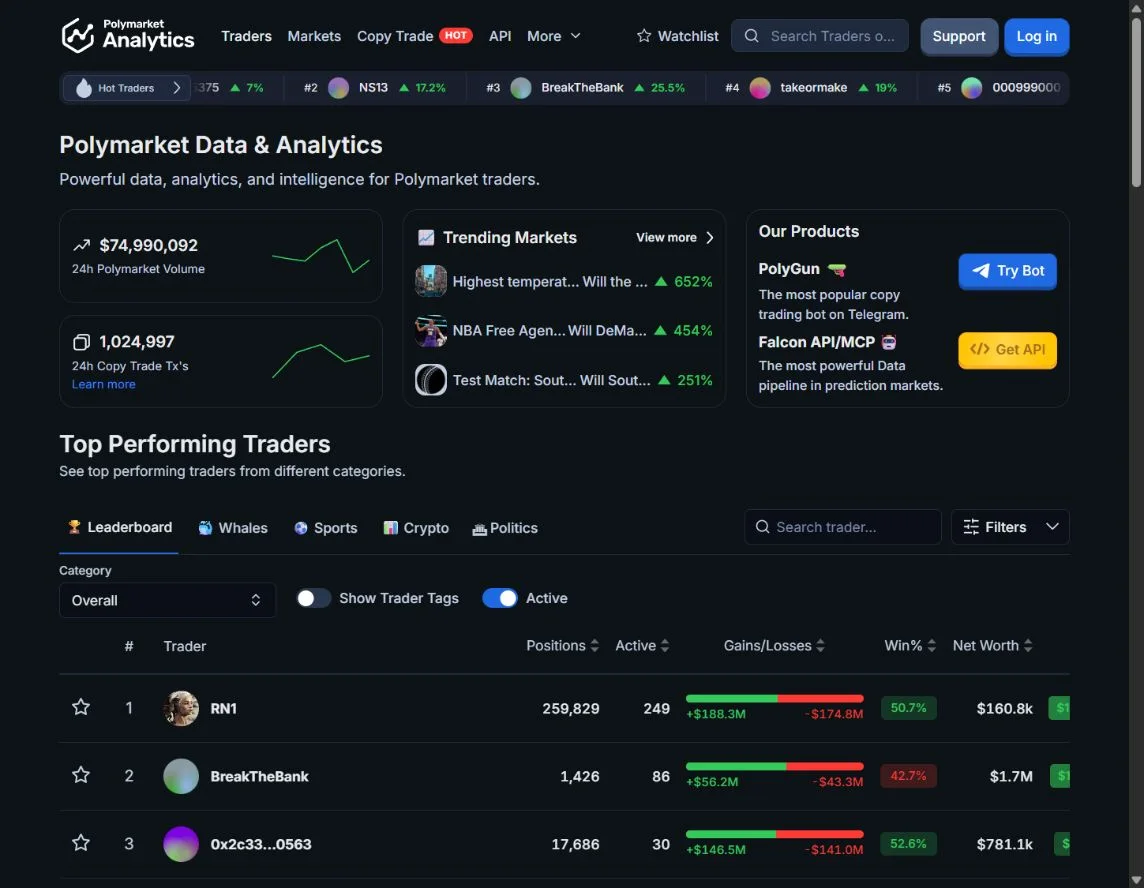
Polymarket Analytics is useful when the next question is about a trader rather than a single market price. Its public trader page provides category shortcuts, a searchable list and performance columns; a wallet profile adds a chart and tabs for positions, categories, trades and deposits or withdrawals.
We inspected those public screens on October 21, 2026. We did not connect a wallet, test a paid plan or use its copy-trading integration. This walkthrough concerns public research on Polymarket's international data. Access to that data does not establish eligibility to trade.
Start with the research question
Decide whether you are looking for a sports specialist, a politics researcher, a large active account or a particular address. These are different searches. The public list has shortcuts such as Leaderboard, Whales, Sports, Crypto and Politics, alongside category and activity controls.
Use those controls to narrow the question, then inspect what the resulting list actually measures. A hot-trader percentage is not an explanation of the account's risk or its capital history. A wallet can look exceptional over a short interval because one large event resolved.
If the list initially looks empty, distinguish a loading state from an actual zero result. During our review, public data populated after the initial page shell. An empty table is not evidence that there are no traders.
Search the exact wallet
Use the address from the trader's public profile rather than relying on a similar display name. Record the address, the date you checked it and the category you are investigating. This makes it possible to revisit the same account later.
The trader list displays positions, activity, gains and losses, win percentage, net worth and PnL. Do not sort one column and assume the others agree. A wallet with many trades, large turnover and modest capital at the observation time can look very different from a passive account holding one winning position.
For a more general evaluation sequence, use the trader PnL checklist.
Compare the chart modes and the same time window
The public profile we inspected exposed Total PnL, Realized PnL and Networth chart controls, with periods including 7D, 1M and Max. Change one setting at a time and write down which view you are reading.
Total profit and realized profit answer different questions. An open position can contribute a mark-to-market gain that disappears before exit. Net worth is also not a return measure by itself: deposits, withdrawals and changing exposure affect the interpretation.
Do not divide a lifetime PnL figure by today's wallet value and call that lifetime ROI. Today's balance is not necessarily all the capital the trader used. The provider's tooltips help explain the display, but a full accounting audit would require more than reading a dashboard.
Inspect positions and categories before the headline
Open Positions to understand what remains exposed. Look for concentration in one event, several outcomes of the same event, and positions that are still awaiting settlement. Ten related outcomes do not necessarily represent ten independent bets.
Use Categories to investigate whether performance is concentrated in a particular field. Then use Trades to connect that history to actual entries and exits. A sports specialist's success does not automatically transfer to a short-duration crypto strategy.
Large gains and large losses can coexist with a relatively modest net result. That is why looking at gross gains alone is a weak way to choose a wallet.
Read cash flows as cash flows
The profile includes a Deposits/Withdrawals tab. Use it to ask whether the apparent growth in account value could reflect new funding or transfers. A deposit is not a trading win, and a withdrawal is not automatically a trading loss.
Keep a small research note: address, observed date, chart mode, period, current exposure, dominant category and unresolved questions. Revisit the note after new trades or settlements instead of treating a single screenshot as a permanent verdict.
Build a shortlist before taking another action
The public interface includes watchlist and copy-trade actions. Those are different workflows from reading a profile. Account features may require login; a copy service can require trading authority and introduces execution costs.
Before moving from research to automation, read the copy-trading evaluation guide. If you want a second analytical view, the Unusual Predictions guide explains category-specific scores and whale context. The tools directory compares both approaches with SQL and direct API research.